Web Experience
- Best Practices for File Names and URLs
- Cru Policy on Bit.ly Links
- What is an SME?
- Google Doc or PDF?
- Landing Page Process
- Rubric for Website Development
- What is a Responsive Website?
- Something is broken on the website
- Web Discovery Questions
Best Practices for File Names and URLs
-
Ditch the junk: No underscores, weird characters, or spaces in your file names or URLs. Just don't.
-
Dashes are your friends: Use dashes instead of spaces. They're totally fine. Search engines recognize them as word separators.
-
Capitalization counts (sometimes): Title casing is cool for file names like "Document.pdf" or "Video.mp4," but keep extended URLs all lowercase (like "jesusfilm.org/watch," not "jesusfilm.org/Watch").
-
Version it up: Even if you think it's the final version, slap a version number on it. You never know!
-
Think like a downloader: Name files in a way that someone searching for it in the future will be able to find it.
-
Maybe add "JFP" at the start.
-
Throw in the year at the beginning or end, too.
-
-
Why all the rules? Mostly for SEO (search engine optimization), but also to avoid links looking weird and to prevent issues with older browsers. Plus, keeps things tidy.
-
Internal vs. Public: You might get away with anything for internal stuff, but sticking to best practices saves headaches later, especially if you plan to share files publicly.
Further reading:
https://www.woorank.com/en/blog/underscores-in-urls-why-are-they-not-recommended
Cru Policy on Bit.ly Links
Prohibited Use
Bit.ly URL shortener links are prohibited for any emails using Cru IPs in the sending process.
Reason
Use of Bit.ly links results in a "ReturnPath Certification" violation.
Consequence
Violations lead to Cru emails being blocked due to the lack of certification whitelisting.
Check the Bit.ly Link
Add a + to the end of any bit.ly link in your browser address bar (e.g., bit.ly/xxxx+) to preview the destination page and inspect the URL before navigating.
What is an SME?
SME most commonly stands for Subject Matter Expert, an individual with deep, specialized knowledge in a particular field, process, or topic, sought for their insights and problem-solving skills.
The role of a Subject Matter Expert (SME) is crucial across various industries and often involves:
-
Content Development: Providing accurate and detailed information for training materials, technical documentation, and project specifications.
-
Consultation and Guidance: Serving as a key resource for project teams, stakeholders, and clients to ensure alignment with best practices and industry standards.
-
Problem Solving: Applying specialized knowledge to diagnose complex issues and develop effective solutions.
-
Quality Assurance: Reviewing deliverables to ensure technical accuracy and compliance.
Google Doc or PDF?
This is the current best practice:
-
Links to Google Docs are usually for internal use only for staff, partners and patrons.
-
Links to PDFs are typically for public use.
An updated PDF can be reuploaded to the same area, so URL stays the same. Suggest using a version number at the bottom for changes, so you know which one is the most current.
Updates can be made in Google Docs as normal, saved, exported as PDF and then someone can upload to Media. With picking the right options, the file URL can stay the same and Vanity URL stays the same.
More in depth information (AI):
A Google Docs link might not be ideal on a website because it can disrupt the visual flow of your page by opening a separate Google Docs interface, potentially requiring users to log in to view the content, and may not seamlessly integrate with your website's design, making the experience less user-friendly; furthermore, depending on the sharing settings, users might be able to edit the document if you haven't set appropriate permissions. [1, 2, 3, 4, 5]
Key reasons why a Google Docs link might not be good on a website: [2, 3, 4]
-
Visual disruption: When a user clicks a Google Docs link, they are taken away from your website to a separate Google Docs page with a different layout and navigation, which can be jarring for the user experience. [2, 3, 4]
-
Login requirement: If the Google Doc isn't set to "Anyone with the link" viewing permission, users might be prompted to log in to their Google account to access the document, creating an extra step for the viewer. [4, 6, 7]
-
Lack of design control: You cannot fully customize how the Google Doc appears within your website, potentially leading to a mismatch in style and branding. [2, 3, 5]
-
Editing concerns: If you share the Google Doc with "Editor" access, users could inadvertently make changes to the document when they click on the link. [1, 4, 7]
Better alternatives to using a direct Google Docs link on a website: [2, 5]
-
Embed the document: Use the "Publish to the web" option in Google Docs to generate an embed code that can be directly integrated into your website, allowing for better visual control. [2, 5]
-
Export as PDF: Download the Google Doc as a PDF and upload it to your website, ensuring a static and consistent view for all users. [2, 3, 5]
-
Copy and paste content: If necessary, manually copy the content from the Google Doc and paste it directly into your website's text editor, formatting as needed. [2, 3, 5]
Generative AI is experimental.
[2] https://learninginhand.com/blog/google-document-url-tricks
[3] https://www.reddit.com/r/gsuite/comments/ki2bfq/why_doe_embedded_google_docs_look_so_terrible_it/
[4] https://www.youtube.com/watch?v=2X0XrRBKgOU
[5] https://support.google.com/docs/answer/183965?hl=en&co=GENIE.Platform%3DDesktop
[6] https://www.reddit.com/r/sysadmin/comments/o3dja3/clicking_google_doc_links_safety_concerns/
[7] https://support.google.com/drive/answer/2494822?hl=en&co=GENIE.Platform%3DDesktop
Landing Page Process
Overview of Process
This document outlines all the parts involved in creating a landing page. There are several phases that need to occur in order for a landing page to be designed, created, launched and maintained.
The typical length of time for a landing page to be created, from discovery to launch, is approximately 8 weeks. This is contingent on stakeholders and other participants keeping to the timeframe and keeping the project within scope. Any changes in scope or delays in deliverables by their due dates, may delay the launching of the landing page.
For admins - access the original Google Drawing of the landing page process here.
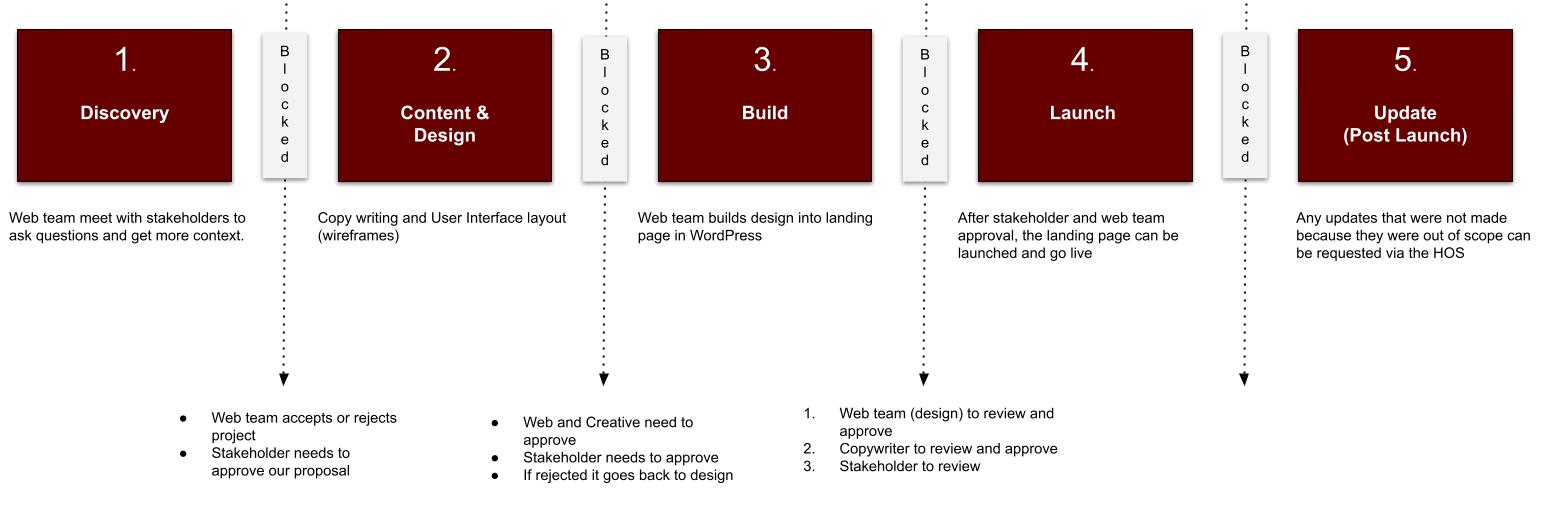
The project and/or phases need to have roles assigned. Use RACI matrix.
What is a landing page?
A landing page is simply a single web page that’s built with one goal in mind—getting visitors to take a specific action (e.g. fill in form, donate, sign up to email, etc). Think of it as a targeted “destination” on the website, where someone arrives after clicking an ad, an email link, or a social‐media post, etc.
What is a discovery meeting?
A discovery meeting is the first structured conversation between the Web team, Story team, project managers and stakeholder. Its sole purpose is to uncover everything you need to know in order to design the right solution—whether that’s a new website, a marketing campaign, a software project, etc.
Where are the discovery questions?
This is a list of generic discovery questions that will be asked of the Stakeholders. Not every question may be applicable depending on the circumstance. This is just a guide use at your own discretion.
Phases
1: Discovery
- Assemble the team - Once the HOS ticket has been approved by the steering committee, project managers need to identify the people to be on the project. I.e. Web team members, Story team members, Stakeholders, etc.
- Discovery meeting (web team will lead this)- Project managers schedule a discovery meeting with all team members and stakeholders to identify:
- Identify scope
- To gain more context
- Identify hinderances
- Understand the strategy
- Ideate
- Ask clarifying questions, etc.
-
Assets and Expectations - We need t identify what assets are assets required, these need to be fully available before phase 2 starts.
- Who is providing the assets?
-
Images - Where can we get them?
-
Videos, Where to we get the videos? (Note: we don’t upload mp4 files to the site, video need to be YouTube needs embed only)
- Who is providing the copy? Is the stakeholder or the GBMS Story team creating the copy for the landing page?
- Accept/Reject - Based on what is uncovered in the discovery the team will decide if they can/should continue
- Proceed or Postpone - Our the web teams needs (required assets) have to be fulfilled before we start the project. Project will be postponed or delayed in starting if we don't have all the assets required. Copy is an exception if GBMS is creating the copy
If there is no strategy, or the strategy does not align with Jesus Film's objectives, the project will be rejected. Due to limited resources we can only commit to projects that are clearly aligned to the organization objectives and goals.
2: Content & Design
- Wireframes - After the Discovery meeting, the copy writers (Story team) will collaborate with web design (Web team) to develop content, mock-up layouts and eventually wireframe.
- Further collaboration - Copy writers and web designers may need to collaborate with SEO (Web team) if this landing pages needs to rank in search engines.
- Deliverables - The designers (Web team) will present wireframe (this not a finished design) to Stakeholders for approval and feedback.
- Feedback and update - if there is feedback and updates required, these will need to be re-delivered and approved. There is only one round of revisions approved to keep the project in scope. Other changes can be done after the page is live.
- Finalization of wireframes - Once approved, the team can move onto phase 3.
What is a wireframe?
A wireframe is a simple, low‑fidelity sketch of a web page or app screen that shows the basic layout and structure—where elements like the header, navigation, images, text blocks, and buttons will go—without any colors, fonts, or detailed graphics. Think of it as the blueprint or floor plan.
3: Build
- Provide assets - All images, copy, videos and other assets need to be given to the web developer (Web team) in the correct format, size, compression etc.
- Functionality - UX (Web team) to collaborate with web developer to communicate desired functionality, aesthetics and expectations of finalized landing page
- Development - Web developer will proceed on building out the landing page on a staging site
- Approval - Both web team and creative (Story team) need to approve final build of landing page (stakeholders are not included in approval process as this point)
- Review - Stakeholder are able to review the landing page. No further changes will be accepted as this point. Updates can be made post launch.
All landing pages need to built on the staging site first, not the live/production version of the website. The staging site can be found here: develop.jesusfilm.org
4: Launch
- Web team to launch page into production (from staging site)
- Link to landing page URL will be shared to project managers who will share it to respective team members
5: Updates (Post Launch)
- If there are required updates that are simple and easy to fix, such as changing and image, or changing some text, then it will be done post launch
- If there is a significant updated or change required a new HOS ticket will need to be processed.
Rubric for Website Development
Rubric for Website (including webpages and CPT) Development or Feature
What are we creating or building?
Why are we doing this?
What benefit or value does it provide (ROI)?
-
Is it worth doing?
-
What audience needs this (understand the user, challenge or validate assumptions)?
-
Others provide this value already?
What are the business goals and how will they be measured?
What is the clear call to action or next step for each page?
Stakeholders:
-
Influencers (usually with veto power)?
-
Finances for development, design, marketing, etc.?
-
Who creates content, form, function, analytics?
-
Who approves and then signs off on Scope of Project?
-
Who implements/provides data model, wireframe, etc.?
-
GBMS team who will develop or approve design, text copy, image assets, etc.
-
Who leads the delivery of a viable product or service?
-
Who will manage content, assets, adds, deletes, updating?
-
Who will market/promote?
-
Ongoing support or SLA (adding users, onboarding, etc.)?
-
Who uses and acts on data, including emails from forms?
Considerations:
Overall JFP/Cru business strategy and existing timelines.
All development uses Branding Guidelines. Includes page templates, navigation, etc.
User-centric design (users are expressing the need for this).
Consider the look of the “responsive” design, especially on mobile devices.
SLA (service level agreement):
-
What GBMS Operations will do (must document what we can realistically provide, create or maintain).
-
Note all assumptions (things we will not do).
-
What WPVIP will do (uptime, page load speed, ticket response, etc.)
-
Data Insights reporting.
-
All this is listed in the Scope of Project.
More details may be needed:
-
Strategic URL naming (may also need a redirect)
-
Hidden or public facing (noindex/nofollow)?
-
Source code “keywords” and “description”?
-
Do we need to set up first in Staging?
-
Special plugins needed that we don’t already have available?
-
Analytics
Basic UX:
-
Strategy - User needs, business goals
-
Scope - Requirements, specifications
-
Structure - Information Architecture
-
Skeleton - Navigation and layout (wireframing)
-
Surface - Visual UI design & coding
When building an inquiry/comment form:
-
First name only or first and last (two fields)
-
Email address
-
What other fields?
-
Email goes to who?
-
Notification information?
-
Any text copy for Subject line, etc.?
Other:
https://form.asana.com/?k=OeMUzqgwHGrIKlTE5Zz8Eg&d=657768513276
What is a Responsive Website?
A responsive website is a website designed to automatically adjust its layout and content to fit different screen sizes and devices, like desktops, tablets, and smartphones, ensuring a consistent and optimal viewing experience regardless of the device used to access it; this is achieved through techniques like flexible grids, responsive images, and CSS media queries.
Key points about responsive websites:
-
Adapts to different screens:
The website automatically rearranges its elements to fit the screen size of the device being used, whether it's a large desktop monitor or a small mobile phone. -
Improved usability:
Users can easily navigate and interact with the website on any device without needing to pinch or zoom excessively. -
Single codebase:
Responsive design typically uses a single set of code that adapts to different screen sizes, simplifying development and maintenance. -
CSS media queries:
A core component of responsive design, media queries are CSS rules that apply different styles based on screen size or other device characteristics.
Additional:
"Resolution switching" refers to the practice of dynamically serving different sized versions of the same image to a user based on their device's screen resolution, allowing the browser to choose the most appropriate image size for optimal viewing quality on various displays, typically achieved using HTML attributes like "srcset" and "sizes" within an <img> tag; essentially, providing a higher resolution image for high-resolution screens and a smaller one for lower resolution screens while maintaining the same visual content.
Something is broken on the website
Encountering an issue on our website, such as a broken link, a missing image, or a typographical error, can be frustrating. We understand that these imperfections detract from your experience, and we appreciate your diligence in helping us maintain the quality of our online presence.
To ensure that these issues are addressed efficiently and directed to the appropriate teams, we kindly request your assistance in reporting them. Our website is a complex ecosystem, with different sections managed by various individuals and specialized teams, each responsible for specific areas. Therefore, sending your report to a centralized point is crucial for proper routing and resolution.
Please send an email to info@jesusfilm.org with the following details:
-
A screen capture or a detailed description of the issue. A visual aid, such as a screenshot, is often the most effective way to convey what you are encountering. If a screenshot isn't feasible, please provide a clear and comprehensive description of the problem.
-
The URL (link to the website page) where the issue is located. This is an essential piece of information that allows us to pinpoint the exact location of the problem without guesswork.
Once your email is received, our dedicated team at info@jesusfilm.org will log your report. They will review the information provided and forward it to the correct department or individual responsible for that specific area of the website. This streamlined process ensures that your feedback reaches the right hands, facilitating a quicker and more effective resolution.
Your active participation in identifying and reporting these issues is invaluable to us. It helps us to continuously improve our website and provide a seamless and engaging experience for all our visitors. Thank you for helping us make our website the best it can be!
Web Discovery Questions
Jesus Film Project Website Stakeholder Discovery Document Template
Purpose of this document
This discovery document is designed to help Jesus Film Project web team gather clear, consistent, and actionable website requirements from internal stakeholders and teams. It is intended for use in stakeholder interviews, intake meetings, workshops, and planning discussions so that website decisions align with ministry goals, audience needs, global realities, and operational constraints.
Both stakeholders and PMOs should fill out the ir respective sections
Rubric for Website Development
Rubric for Website (including webpages and CPT) Development or Feature. Learn more.
1. Stakeholder Overview
Why this matters:
This section establishes who is making the request, what team they represent, and what role they play in the success of the initiative. It also helps clarify decision-making authority, influence, and accountability early in the process.
Stakeholder details
-
Stakeholder name:
-
Title / role:
-
Team / department:
-
Date:
-
Facilitator:
-
Related initiative / project name:
-
Other involved stakeholders:
-
Level of decision-making authority:
-
Regions / languages / ministries represented:
Discovery questions
-
What team or ministry area do you represent?
-
What is your role in this initiative or request?
-
What responsibility does your team have for the website, if any?
-
Who else should be involved in this conversation?
-
Who is the final decision-maker for this request?
-
Which departments, regions, or language teams are affected?
-
Is this request driven by a specific campaign, strategic initiative, ministry need, or operational issue?
-
Has this need been discussed before? If so, what was decided?
2. Ministry and Organization Goals
Why this matters:
Website requests should support broader ministry and organizational objectives, not just isolated preferences. This section helps connect website needs to mission impact, strategic priorities, and measurable outcomes.
Discovery questions
-
What ministry objective is driving this request?
-
What organizational or team goal does this support?
-
Why is this important now?
-
What problem are you trying to solve, or what opportunity are you trying to capture?
-
How does this request support the mission of JFP?
-
How does this request serve evangelism, ministry partnership, resource distribution, or disciple-making?
-
What outcome would make this request successful from your team’s perspective?
-
Is this tied to a larger strategic initiative, annual objective, or leadership priority?
-
What would happen if this request is delayed or not implemented?
-
Is this a short-term need, long-term need, or both?
3. Audience and User Needs
Why this matters:
Effective website decisions begin with a clear understanding of who the user is and what they are trying to accomplish. This section helps ensure requests are rooted in real audience needs rather than internal assumptions.
Primary audiences to consider
-
Decision-makers at other Christian ministries focused on evangelism
-
Individual believers who want to evangelize more effectively
Discovery questions
-
Who is the primary audience for this request?
-
Is the audience external, internal, or both?
-
What type of ministry leader, partner, or user are you trying to reach?
-
What does this audience need most from the website?
-
What are they trying to do, learn, find, or accomplish?
-
What are their likely pain points, frustrations, or barriers?
-
What questions do they typically have before taking action?
-
What level of awareness or familiarity do they already have with JFP?
-
Are there audience differences by region, language, ministry maturity, or church context?
-
What might success look like from the user’s point of view?
4. Key Website Pain Points
Why this matters:
This section surfaces what is currently not working so teams can address root issues rather than symptoms. It also helps distinguish between perceived problems and truly high-impact barriers.
Discovery questions
-
What is not working well on the website today?
-
Where are users getting stuck, confused, or dropping off?
-
What complaints, feedback, or recurring questions do you hear from users or internal teams?
-
Are there gaps in content, functionality, navigation, or messaging?
-
Are there parts of the site that feel outdated, unclear, hard to use, or misaligned?
-
What internal processes make it difficult to support this area of the website?
-
What workarounds are teams currently using?
-
What is the biggest pain point you would fix first?
-
Are these issues affecting one audience, multiple audiences, or global users broadly?
-
Which pain points are urgent versus inconvenient?
5. Content and Messaging Needs
Why this matters:
Content is often the clearest expression of ministry value, clarity, and trust. This section helps identify what content is needed, who it is for, and how messaging should support both ministry impact and user action.
Discovery questions
-
What content is needed to support this request?
-
What existing content already exists, and what is missing?
-
Does the current messaging clearly explain the value of this ministry, resource, tool, or initiative?
-
What does the audience most need to understand, trust, or believe before taking action?
-
What specific pages, content types, or assets are needed?
-
Are there key calls to action that need to be strengthened or clarified?
-
Does the content need to serve different audience segments differently?
-
Are there theological, ministry, or brand considerations that need to shape the messaging?
-
Who owns the content strategy, writing, review, translation, and updates?
-
What content should remain evergreen, and what content will require regular maintenance?
-
Are there stories, case studies, testimonies, or field examples that should support this content?
-
What tone should the content reflect for this audience?
6. Language and Localization Considerations
Why this matters:
Because JFP serves a global audience, language and localization cannot be treated as afterthoughts. This section helps clarify translation needs, regional differences, cultural adaptation, and operational realities across markets.
Discovery questions
-
Which languages are needed for this request?
-
Is direct translation sufficient, or does content need cultural adaptation?
-
Are there region-specific user needs, examples, offers, or calls to action?
-
Which markets or countries are most important for this initiative?
-
Are there languages that should be prioritized first?
-
What is the translation and localization workflow today?
-
Who reviews translations for quality, clarity, and theological accuracy?
-
Are there known challenges with multilingual publishing, governance, or maintenance?
-
Will all features and content be available in all languages?
-
How should the site handle language selection, fallback content, and untranslated pages?
-
Are there localization considerations related to imagery, examples, ministries, testimonies, or terminology?
-
What would make this experience feel more locally relevant and useful?
7. Functional and Feature Requirements
Why this matters:
Stakeholders often express needs in terms of desired features, but the underlying requirement may be different. This section helps clarify what users need to do, what the business needs to support, and what functionality is essential versus optional.
Discovery questions
-
What does the user need to be able to do on the website?
-
What feature or capability is needed to support that action?
-
Is this a new feature, improvement to an existing feature, or replacement of a current process?
-
What specific functionality is required?
-
Are forms, downloads, search, filtering, account features, integrations, or content personalization involved?
-
Does this request require different functionality by audience, language, or region?
-
Are there required user journeys or business rules?
-
What systems, teams, or workflows would this feature affect?
-
What does a minimum viable version look like?
-
What is essential on day one, and what could be phased later?
-
Are there accessibility, security, privacy, or compliance considerations?
-
What feature requests are truly necessary versus simply desirable?
8. UX and Journey Considerations
Why this matters:
A website can have good content and strong functionality but still fail if the user journey is confusing. This section helps identify how users move through the site, what actions matter most, and where better clarity or guidance is needed.
Discovery questions
-
What is the ideal user journey for this audience?
-
What are the key entry points into this experience?
-
What action should users take next after landing on the page?
-
Where do users need more clarity, reassurance, or direction?
-
What steps in the journey feel too complicated, long, or unclear?
-
What information does the user need first, second, and third?
-
What questions or objections should the page or experience answer?
-
Are there important journey differences by device, language, or geography?
-
Should the experience drive exploration, conversion, engagement, or relationship-building?
-
What would a better user experience look like in practical terms?
-
Are there known navigation issues affecting this journey?
-
What examples from other sites or experiences feel relevant, useful, or inspiring?
9. Technical / Platform Considerations
Why this matters:
Even strong ideas can fail without technical feasibility, platform alignment, and realistic implementation planning. This section helps capture constraints, dependencies, and opportunities early enough to plan wisely.
Discovery questions
-
Are there technical constraints we need to know about?
-
Does the current platform support this request?
-
Are integrations required with CRM, analytics, DAM, translation systems, forms, email, or partner tools?
-
Does this request affect performance, security, scalability, or maintainability?
-
Are there known issues with the current CMS, templates, or publishing workflows?
-
Does the request require custom development, third-party tools, or vendor support?
-
Are there mobile, browser, or device-specific considerations?
-
Are there accessibility standards this solution must meet?
-
Is there existing technical debt that could affect this request?
-
What internal technical resources are required to support this?
-
Are there data privacy, consent, or regional compliance issues to consider?
-
What technical assumptions need to be validated before moving forward?
10. SEO, Search, Analytics, and Measurement
Why this matters:
A ministry website still needs to be discoverable, measurable, and optimizable. This section helps ensure requests consider findability, onsite search, performance data, and meaningful success indicators from the start.
Discovery questions
-
How should users find this content or experience?
-
Is organic search an important traffic source for this initiative?
-
What search intent is this content or feature meant to serve?
-
Are there important keywords, topics, or questions this should address?
-
How should internal site search support this experience?
-
What analytics are currently available for this area?
-
What data do you already have about user behavior, performance, or demand?
-
What metrics would indicate success?
-
Are conversions clearly defined?
-
Do we need event tracking, funnel tracking, scroll tracking, form tracking, or campaign attribution?
-
Are there SEO risks such as duplication, localization complexity, or weak information architecture?
-
What performance benchmarks or baselines should we compare against?
11. Governance, Approvals, and Ownership
Why this matters:
Many website issues are not caused by technology, but by unclear ownership and inefficient workflows. This section helps define who is responsible for decisions, content, approvals, updates, and long-term stewardship.
Discovery questions
-
Who owns this initiative from a business or ministry perspective?
-
Who owns the content once it is published?
-
Who approves strategy, content, design, theology, and technical implementation?
-
What teams need to review or sign off?
-
What is the current workflow for creating, reviewing, translating, and publishing content?
-
Where do delays usually happen?
-
Who is responsible for ongoing maintenance and updates?
-
How often will this need to be reviewed or refreshed?
-
Are there governance policies or standards that apply?
-
Is there confusion today around roles, approvals, or decision rights?
-
What would make the workflow more efficient and sustainable?
-
Who will be accountable for outcomes after launch?
12. Risks, Blockers, and Dependencies
Why this matters:
This section helps teams anticipate what could slow down, complicate, or weaken implementation. It brings hidden concerns into the open so they can be addressed before they become project failures.
Discovery questions
-
What risks do you see with this request?
-
What could prevent this from succeeding?
-
Are there budget, staffing, timing, or technology constraints?
-
Does this depend on other teams, systems, approvals, or external partners?
-
Are there unresolved strategic questions that need leadership input?
-
Are there theological, brand, legal, or cultural sensitivities involved?
-
Is this request dependent on translation, content creation, or technical infrastructure not yet in place?
-
What assumptions are we making that may not be true?
-
What could cause delays after the work begins?
-
What previous lessons or failed attempts should inform this effort?
-
What is the greatest implementation risk?
-
What would reduce uncertainty before moving ahead?
13. Priority Level and Implementation Readiness
Why this matters:
Not every request should be treated equally. This section helps distinguish strategic, urgent, and high-impact work from lower-value ideas or requests that are not yet ready for execution.
Discovery questions
-
How important is this request relative to other ministry and website priorities?
-
Is this urgent, important, or exploratory?
-
What is driving the timeline?
-
Is there a deadline, event, campaign, launch, or external dependency?
-
What is the cost of not doing this?
-
What is the expected impact if this is implemented?
-
Is the request clearly defined enough to move forward?
-
What information is still missing before this can be scoped?
-
Is content ready, or still being developed?
-
Are stakeholders aligned on the need and desired outcome?
-
Could this be delivered in phases?
-
Is this a must-have, should-have, could-have, or not-now item?
Priority assessment
-
Priority level:
-
Business / ministry impact:
-
Audience impact:
-
Urgency:
-
Level of effort:
-
Readiness status:
-
Recommended phase:
14. Summary and Recommendations
Why this matters:
A discovery process is only useful if it leads to clarity and action. This section captures the most important findings, recommended next steps, and decisions needed to move forward.
Summary fields
-
Request / initiative name:
-
Stakeholder / team:
-
Primary audience:
-
Core problem to solve:
-
Desired outcome:
-
Key user need:
-
Key website need:
-
Key risks:
-
Key dependencies:
-
Recommended priority:
-
Recommended next step:
-
Owner:
-
Proposed timeline:
Summary questions
-
What is the core need behind this request?
-
What problem are we solving for the audience and the ministry?
-
What requirements are clearly defined?
-
What needs more validation, research, or alignment?
-
What should happen next?
-
Who needs to make a decision?
-
What should be prioritized now, later, or not at all?
-
What recommendation best balances ministry impact, user value, and operational feasibility?