Creative
- Creating images for the JFP website
- CONTENT Writing Norms - Drafting, Editing and Revisions
- CONTENT Gathering Norms - Pursuing Leads + Research, Interviewing, Citations
- Content Gathering Workflow - Mktg Stories
- Creative & Content Content Development Team - Workflows
- Creating Folders & Naming Google Docs (GBMS Writers)
Creating images for the JFP website
Image File Types and Optimization:
-
Most images should be saved as JPG files to ensure detailed colors and smaller file sizes.
-
For images requiring a transparent background, save them as PNG files.
-
Always "optimize for web" when saving any image.
Aspect Ratios and Sizing:
-
General Horizontal Images: A 16:9 aspect ratio is preferred for most horizontal images, matching our movie clips. You can verify your cropping at https://aspectratiocalculator.com/16-9.html.
-
Full-length "Hero" banner image (main page): Typically 1920 x 1080 pixels. The web team can overlay text and darken the opacity of the image as needed.
-
Other horizontal images on webpages: Usually 700 x 394 pixels.
-
-
DevCard Image (main page): Typically 393 x 516 pixels (portrait layout). This image will need to be darkened to ensure text copy is visible.
-
Blog Post Images: Currently 1200 x 627 pixels.
-
Leader Portrait Images (see "Team" page): 1240 x 1560 pixels.
CONTENT Writing Norms - Drafting, Editing and Revisions
See attachments section for linked guide.
CONTENT Gathering Norms - Pursuing Leads + Research, Interviewing, Citations
See attachments section for linked guide.
Content Gathering Workflow - Mktg Stories
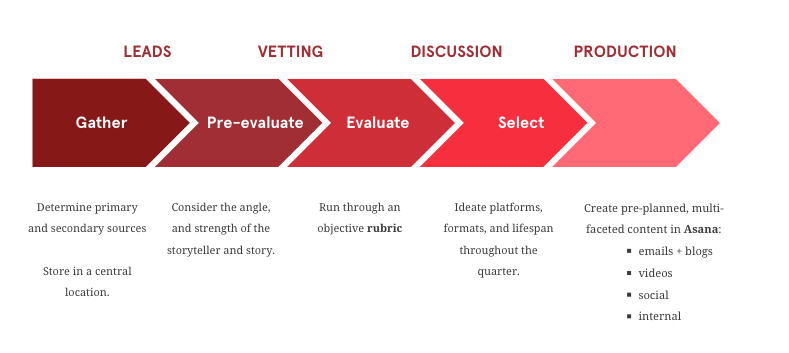
Marketing STORY Process [ Full Canva Presentation]
ALL Slides in PDF format - see attachments section
Creative & Content Content Development Team - Workflows
View diagrams in Canva Presentation.
PDF - all workflows in attachments section.
Included workflows:
- Copywriter Process
- Copywriter Task Types
- Creative Team Interactions
- Sr. Content Manager vs. Sr. Campaign Manager (Reviewer Interactions)
- How to address questions/concerns stemming from review.
- Template - Team collaboration diagram
Creating Folders & Naming Google Docs (GBMS Writers)
See attached PDF and linked file for GBMS Writers folder naming convention.